
µTorrent® Pro - Torrent App
bittorrent.comVideo Players & Editors
4.83.79K Reviews
- Version
- 8.2.55
- Installs
- 500.00K
- Age Rating
- Everyone
Screenshots
Our Review of µTorrent® Pro - Torrent App
 Analysis by Appyee
For anyone who uses torrents to collect legitimate files, downloading on a phone can be useful but a little fiddly. µTorrent® Pro - Torrent App brings the familiar torrent workflow to Android, with controls for managing transfers and opening downloaded media. I see its appeal most clearly when I want a download to run while I’m doing something else, then need to check its progress without sitting at a computer. It is less compelling if I only download occasionally or prefer to keep file transfers on a desktop.
Reading the queue and finding the right control
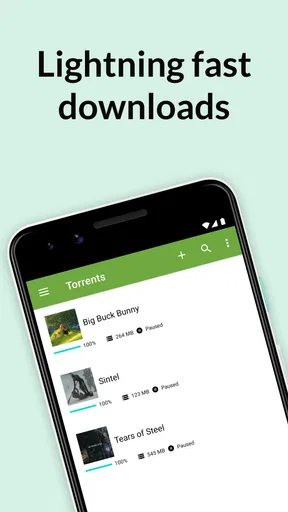
The clearest part of the experience is the download overview. Active, completed, and inactive items are separated, so I can tell at a glance what is still moving and what is ready to use. That organization matters more than it sounds: on a small screen, a long undifferentiated list makes it easy to overlook a stalled transfer or tap the wrong item.
The interface is fairly approachable for someone who already understands the basics of torrents. A newcomer can see the queue without learning a complicated set of menus, while someone who wants more control can adjust transfer limits and choose which files to include. I would still take a moment to check those choices before starting a large torrent; selecting only the files I need is a practical way to avoid filling the phone with extras.
µTorrent Pro is a paid app from Rainberry, Inc. in the video-player and editing category, though its main job here is torrent downloading rather than editing video. It costs $2.99, is rated for Everyone, and its current Android release is version 8.2.55, with Android 7.0 as the minimum system requirement. The app has a 4.8 average from around 44,000 ratings, and has been installed over 500,000 times. Those figures suggest a well-established audience, but I would base the decision on whether mobile torrenting actually fits my routine.
Controls that help in different situations
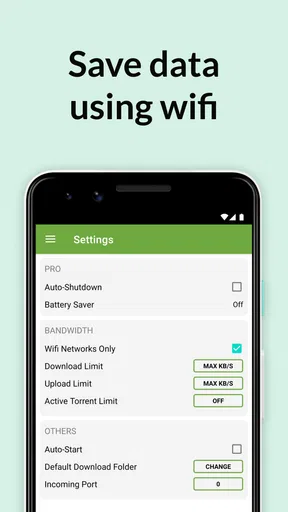
Setting upload and download limits is one of the most useful controls for everyday use. On a home connection, I can keep a transfer from taking over the bandwidth while other people are streaming or working. On mobile data, a conservative limit can make a download less disruptive, although it does not replace checking my carrier plan or choosing Wi-Fi when a file is large.
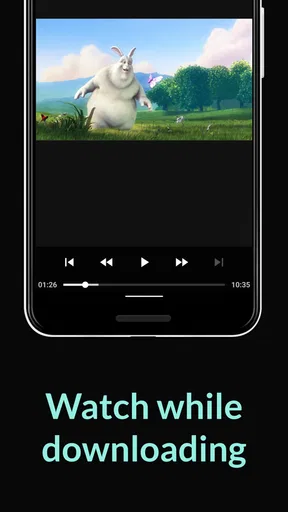
The ability to play a completed download inside the app can save a step when I just want to check a video. It also gives me a quick way to confirm that a file opens before I move on to another task. For longer viewing, I may still prefer a dedicated player if I rely on its particular playback controls, display options, or organization. The built-in option is convenient, not a reason to expect a full replacement for every media app.
There are useful accessibility trade-offs to consider. The visible queue and direct controls make routine checks possible without a deep tour of settings, but torrent management still asks the user to interpret status and file choices. If small touch targets, dense lists, or prolonged screen use are difficult for you, try the main queue and file-selection flow early rather than assuming that a simple first screen means every task will feel equally easy.
When a phone is the right place for a torrent
A realistic use is downloading a freely shared video or other permitted file over home Wi-Fi while I make dinner, then checking the queue briefly before watching it later. I can limit the transfer so it does not crowd out a video call, and select only the needed files if the torrent contains several items. That is a more sensible phone workflow than starting a large transfer on mobile data and leaving it unattended without checking the limits.
Compared with a desktop torrent client, the mobile app is handy when the phone is already with me and I want to manage a modest queue without opening a computer. A desktop is usually the better choice for long-running, heavily organized libraries or transfers that need a large screen and a more comfortable file-management workflow. Compared with a basic video player, µTorrent Pro is useful earlier in the process: it handles the torrent transfer and offers playback, while a dedicated player may be preferable once the file is ready.
Where the experience can still be awkward
Even with a tidy queue, torrenting is not a one-tap substitute for ordinary downloads. The result depends on the torrent and its availability, and a transfer can take time; the app cannot make an unavailable file arrive quickly. Choosing files, understanding transfer status, and deciding suitable limits all require attention. If I only need a single file from a direct download, a browser or cloud-storage app is often simpler.
Battery use and heat are also worth treating as practical constraints rather than assuming any mobile client can make them disappear. I would start large transfers while connected to Wi-Fi and power when convenient, check the phone after the first few minutes, and pause the queue if the device becomes uncomfortable to use. The app’s battery-saving positioning is appealing, but active transfers still ask a phone to do sustained work.
Privacy needs the same careful judgment. The app supports encryption and proxy servers, which may matter to users who understand those tools, but neither should be treated as a guarantee of anonymity or permission to download copyrighted material. I would use torrents only for files I have the right to access, and avoid entering proxy details unless I understand who operates the service and what its settings mean.
A useful choice for the right kind of mobile user
I’d recommend this app to someone who already uses torrents responsibly, wants to manage transfers from an Android phone, and values selective downloads, adjustable limits, and playback without switching apps. The paid, ad-free approach may also suit someone who dislikes interruptions and expects to use the app regularly. Its Everyone age rating describes the app’s content classification, not a substitute for adult guidance about lawful and safe file sharing.
I would skip it if torrents are an occasional need, if I want a straightforward direct-download tool, or if I find queue management and file selection uncomfortable on a touchscreen. People who depend on larger controls, assistive technology, or highly customized playback should check whether the app’s actual screens work for their needs before paying. My inclusive verdict is that the uncluttered overview and adjustable limits help, but they do not remove the learning curve or every motor and sensory barrier.
When it comes to downloading torrents on your mobile device, µTorrent® Pro - Torrent App is a name that often pops up. If you're someone who loves downloading content on the go, this app might just be your new best friend. Let me take you through my experience with this handy little app.
First Impressions and User Interface
Alright, so first things first, installation was a breeze. Once I got µTorrent® Pro - Torrent App up and running, the interface immediately caught my eye. It's clean, intuitive, and doesn’t bombard you with unnecessary options. Everything you need is right there at your fingertips, making navigation super easy even if you’re new to torrenting.
The home screen gives you a quick overview of active, completed, and inactive downloads. I found this really handy because, let's face it, sometimes we juggle multiple downloads and it's nice to have them all neatly organized.
Features That Stand Out
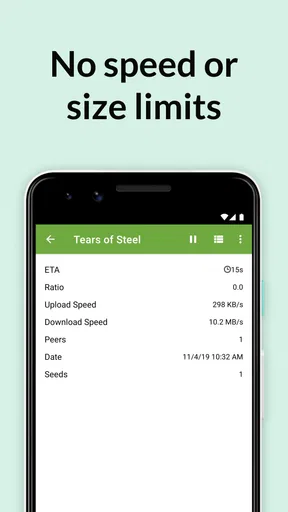
Now, let’s get into the nitty-gritty—what makes this app worth it? Well, for starters, the download speeds are pretty impressive. I tested it on both Wi-Fi and mobile data, and in both cases, it was smooth sailing. You can also set download/upload limits, which is a lifesaver if you’re worried about data usage.
One feature I particularly loved is the ability to play downloads right from the app. No need to jump between apps to watch your downloaded content. It's just click and play. Plus, there's no annoying ads popping up everywhere, which is a huge relief. I mean, who likes being interrupted by ads in the middle of something?
For the tech-savvy, there’s an option to select specific files to download within a torrent. This means you can skip the files you don’t need and save on space. Kudos to the developers for including this!
Performance and Reliability
Let’s talk performance. Over several days of use, I didn’t encounter any crashes or major glitches. The app seems well-optimized for both Android and iOS. Even when I had multiple downloads running, the app didn’t slow down or freeze. It was as reliable as they come.
Battery usage was reasonable. I mean, torrenting is resource-intensive by nature, but this app managed to keep things under control. My phone didn’t turn into a heating pad, which was a pleasant surprise.
Security and Privacy
Now, on to something that’s on everyone’s mind these days—security. The app offers built-in encryption, which is a big plus if you’re concerned about privacy. It also supports proxy servers, adding an extra layer of security to your downloads.
However, keep in mind that torrenting itself can be a gray area depending on what you’re downloading. So, always ensure you’re in the clear legally!
Final Thoughts
In conclusion, µTorrent® Pro - Torrent App is a solid choice for anyone looking to download torrents on their mobile device. It’s user-friendly, reliable, and packed with useful features. Sure, it’s a paid app, but you’re getting a premium experience without interruptions from ads.
If you’re serious about torrenting on the go, this app is definitely worth considering. Just remember to use it responsibly and make sure you're staying on the right side of the law!
Verdict
Strengths of µTorrent® Pro - Torrent App
- Ad-free experience enhances usability.
- Allows multiple simultaneous downloads.
- Battery-saving features are effective.
- Supports large file downloads smoothly.
- Integrated media player for easy playback.
Limitations of µTorrent® Pro - Torrent App
- Limited torrent search functionality.
- Some features require manual configuration.
- Occasional download speed fluctuations.
- No built-in VPN for privacy protection.
- Updates can interrupt active downloads.
Other Releases by bittorrent.com
View All
µTorrent®- Torrent Downloader
Video Players & Editors4.6

BitTorrent®- Torrent Downloads
Video Players & Editors4.5
Similar Picks in This Category
View All
Google TV
Google LLC3.9

iTunes
Apple4.7

YouTube
Google LLC3.8

MX Player
Amazon Mobile LLC4.2

CapCut - Video Editor
Bytedance Pte. Ltd.3.5

PLAYit-All in One Video Player
PLAYIT TECHNOLOGY PTE. LTD.4.5
Frequently Asked Questions
How does µTorrent® Pro differ from the free version?
µTorrent® Pro offers several enhancements over the free version, including no ads for a cleaner interface, faster download speeds, and the ability to stream media files instantly without waiting for the download to complete. Additionally, Pro users receive automatic protection from viruses and malware, ensuring a safer downloading experience.
Is µTorrent® Pro safe to use on my device?
Yes, µTorrent® Pro is designed with safety in mind. It includes built-in malware and virus protection to safeguard your device. However, it is always recommended to download torrents from trusted sources and maintain updated antivirus software on your device to enhance security.
Can I use µTorrent® Pro on both Android and iOS devices?
µTorrent® Pro is available for Android devices. Unfortunately, it is not available for iOS directly due to Apple's restrictions on torrenting apps. However, users often find alternative ways to manage torrents on iOS devices through web-based clients or remote management apps.
What are the system requirements for installing µTorrent® Pro?
µTorrent® Pro is compatible with most Android devices running Android 5.0 and above. It requires a stable internet connection and sufficient storage space for downloading large files. For optimal performance, having a device with reasonable processing power and memory is beneficial.
Does µTorrent® Pro support downloading multiple files simultaneously?
Yes, µTorrent® Pro supports downloading multiple files at the same time. It efficiently manages bandwidth to ensure that all active downloads proceed smoothly. Users can also allocate bandwidth priorities to specific files, enabling faster downloads for important torrents.
